Learn Chinese Pinyin: Complete Guide to Pinyin Pronunciation & Typing (2026)
🚀 Quick Navigation – Master Chinese Pinyin in 8 Steps
Podcast Player
🎧
Master Chinese Pinyin: Audio Guide for English Speakers

Learn Chinese Pinyin pronunciation with our comprehensive audio guide. Master pinyin to Chinese conversion, tones, and typing methods.
1. Why Learn Chinese Pinyin? Your Gateway to 1.4 Billion Conversations
Chinese Pinyin (汉语拼音) is the standard way to change Chinese characters into letters. This helps you read, type, and say Chinese words correctly. Learning Pinyin is a fast way to become fluent in Mandarin, whether for work, travel, or personal growth.
Why Chinese Pinyin is Essential in 2026:
For Complete Beginners: Chinese Pinyin removes the intimidation of Chinese characters. Instead of facing the challenge of memorizing thousands of complex characters right away, you can start speaking Chinese today using familiar Latin letters. This approach to learning Pinyin helps you build confidence and communicate from day one.
For Digital Communication: Every Chinese Pinyin keyboard available on Windows, Mac, iPhone, and Android utilizes Pinyin input. When you type “nihao” on a Pinyin keyboard, it is automatically converted to “你好.” Over 1 billion people use Pinyin daily to convert Chinese characters while communicating on platforms like WeChat, in emails, and on social media.
For Accurate Pronunciation: Without pinyin, you might pronounce Beijing as “Bay-jing” instead of the correct “Bei-jing”. Pinyin shows you exactly how to pronounce every Chinese word correctly, including the critical tones that change meanings completely.
Real-World Applications:
- Business: Read Chinese names correctly in meetings (e.g., “Zhang Wei” not “Chang Way”)
- Travel: Order food, ask directions, and connect with locals using proper pronunciation
- Technology: Use Chinese apps, websites, and online pinyin tools effectively
- Education: Access Chinese learning materials and pinyin dictionaries worldwide
Related: Learn Chinese in 2025: Unlock Global Career Opportunities
2. Crack the Chinese Pinyin Code: Master Initials, Finals & Tones
2.1 The Chinese Pinyin Formula: Initial + Final + Tone = Perfect Pronunciation
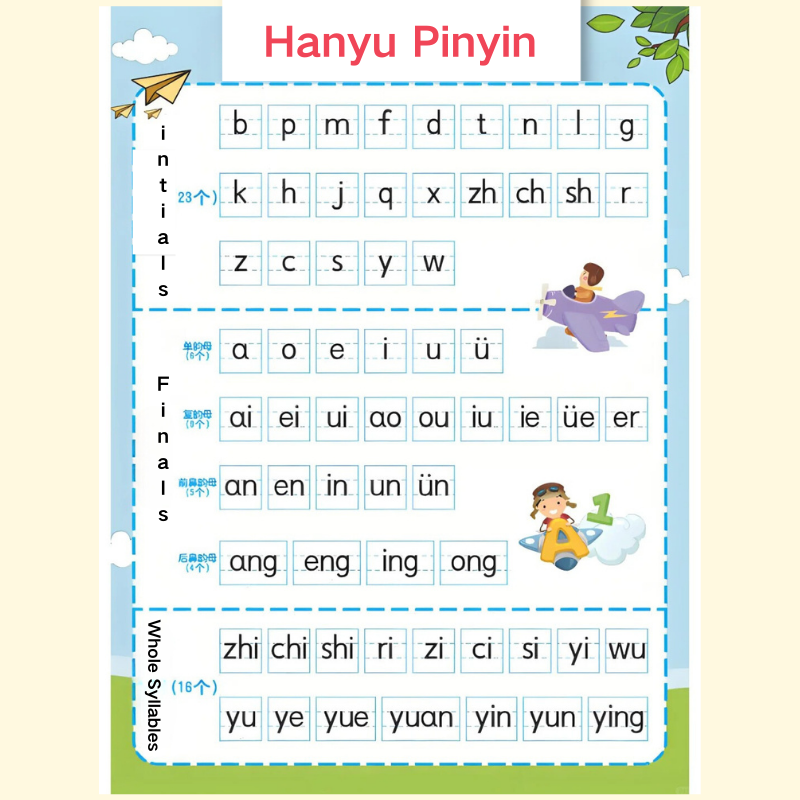
Understanding Chinese Pinyin structure is like learning a simple code. Every Chinese syllable combines an initial (consonant sound), a final (vowel sound), and a tone (pitch pattern). Master these three elements, and you can pronounce any Chinese word perfectly.
Complete Pinyin Initials List (21 Consonants):
Labials (Lip sounds): b, p, m, f
Dentals (Teeth sounds): d, t, n, l
Gutturals (Throat sounds): g, k, h
Palatals (Flat tongue): j, q, x
Retroflexes (Curled tongue): zh, ch, sh, r
Dental sibilants (Hissing sounds): z, c, s
Essential Pinyin Finals (35 Vowel Combinations):
Simple finals: a, o, e, i, u, ü
Compound finals: ai, ei, ao, ou, an, en, ang, eng, ong
Special combinations: ia, ie, iao, iou(iu), ian, in, iang, ing, iong, ua, uo, uai, uei(ui), uan, uen(un), uang, ueng, üe, üan, ün
Pro Tip for Typing: Since standard keyboards lack “ü”, Chinese pinyin input methods use “v” or “uu”—for example, type “lv” or “luu” for “lǜ” (green).
2.2 Master the Four Chinese Tones (Plus Neutral Tone)
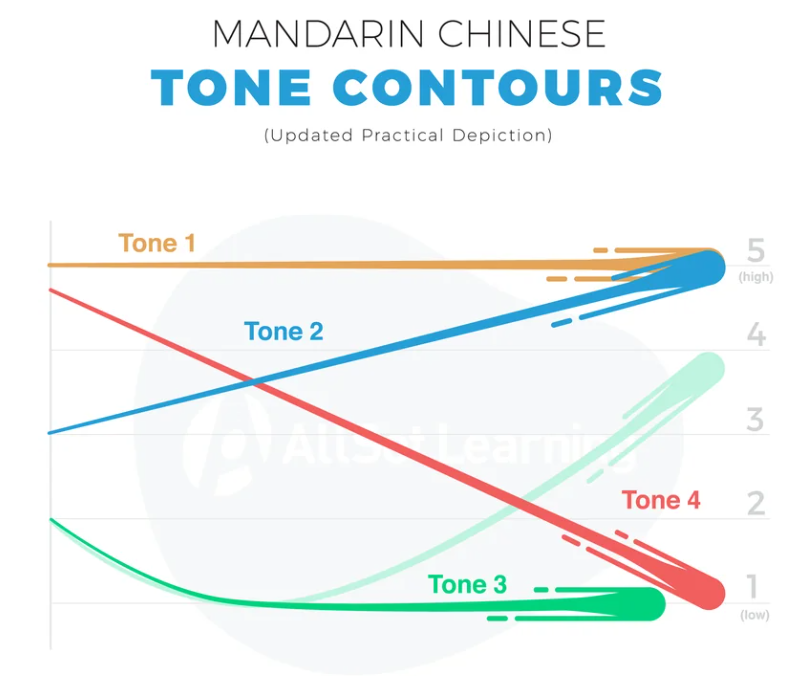
Chinese tones transform meaning completely. The syllable “ma” can mean mother (mā), hemp (má), horse (mǎ), scold (mà), or a question particle (ma), depending on tone:
- First Tone (ˉ): High and flat like singing a high note – mā (妈, mother)
- Second Tone (ˊ): Rising like asking “Really?” – má (麻, hemp)
- Third Tone (ˇ): Dipping down then up – mǎ (马, horse)
- Fourth Tone (ˋ): Sharp falling like saying “No!” – mà (骂, scold)
- Neutral Tone: Light and quick – ma (吗, question particle)
2.3 Special Pinyin Syllables That Trip Up Beginners
These seven syllables look simple but require special pronunciation:
- zhi, chi, shi, ri – Curl your tongue back (retroflex)
- zi, ci, si – Keep tongue flat behind teeth
Common Mistake: Reading “zhi” as “z-h-i” separately.
Correct: Treat “zhi” as one sound, like “jr” with a curled tongue.
Chinese Pinyin Converter
Convert any Chinese text to pinyin, with each word tagged by its HSK level.
HSK levels are based on the HSK 3.0 standard (国际中文教育中文水平等级标准, 2021).
Interactive tone practice
Click any tone card to hear the pronunciation. Audio depends on your browser's speech support.
3. Five Pinyin Pronunciation Mistakes That Instantly Reveal You’re Not Native (And How to Fix Them)
Mistake #1: Confusing j/q/x with zh/ch/sh
The Problem: English speakers often can’t hear the difference between “xi” (西, west) and “shi” (是, is).
The Fix:
- For j, q, x: Keep your tongue flat, touching your lower teeth
- For zh, ch, sh: Curl your tongue back toward the roof
- Practice minimal pairs: xiǎo (小, small) vs. shǎo (少, few)
Mistake #2: Ignoring Tone Changes (Tone Sandhi)
The Problem: Reading “nǐ hǎo” character by character instead of the natural “ní hǎo”.
The Fix:
- When two 3rd tones meet, the first becomes the 2nd tone
- Practice common phrases:
- nǐ hǎo → ní hǎo (你好, hello)
- hěn hǎo → hén hǎo (很好, very good)
- wǒ xiǎng → wó xiǎng (我想, I want)
Mistake #3: The “ü” Sound Confusion
The Problem: Pronouncing “nǚ” (女, female) like “nu” (奴, slave).
The Fix:
- u = “oo” as in “food”
- ü = Start with “ee”, then round your lips
- Practice: lǜ (绿, green), nǚ (女, female), yú (鱼, fish)
Mistake #4: Mishandling Retroflex Finals (-r endings)
The Problem: Dropping the -r sound in Beijing dialect words.
The Fix:
- Curl your tongue while maintaining the vowel
- Practice: ér (儿, child), nǎr (哪儿, where), yīdiǎnr (一点儿, a little)
Mistake #5: Flat Neutral Tones
The Problem: Over-pronouncing neutral tones, making speech sound robotic.
The Fix:
- Neutral tones are light and quick
- Practice: māma (妈妈, mom), bàba (爸爸, dad), péngyou (朋友, friend)
4. Type Chinese Like a Native: Complete Pinyin Keyboard Setup & Advanced Tips
4.1 Why Pinyin Input Dominates Chinese Typing
Over 95% of Chinese users type using pinyin-to-Chinese conversion. When you type pinyin syllables, intelligent algorithms instantly suggest the correct Chinese characters. Modern Chinese pinyin keyboards even predict entire sentences!
4.2 Step-by-Step Pinyin Keyboard Installation Guide
Windows 10/11 Chinese Pinyin Setup:
- Open Settings → Time & Language → Language & Region
- Click “Add a language” → Search “Chinese (Simplified, China)”
- Select “中文(简体)” and click “Next”
- Choose “Microsoft Pinyin” as your input method
- Installation complete! Press
Windows + Spaceto switch keyboards
Pro Settings:
- Enable fuzzy pinyin for Southern Chinese accents
- Turn on predictive text for faster typing
- Customize shortcuts for symbols
Mac Chinese Keyboard Setup:
- System Preferences → Keyboard → Input Sources
- Click the “+” button → Select “Chinese, Simplified”
- Choose “Pinyin – Simplified”
- Enable “Show Input menu in menu bar”
- Switch with
Control + Space
iPhone Pinyin Keyboard:
- Settings → General → Keyboard → Keyboards
- Tap “Add New Keyboard”
- Select “Chinese, Simplified” → “Pinyin-QWERTY”
- Globe icon switches between keyboards
Android Chinese Keyboard:
- Settings → System → Languages & Input
- Virtual Keyboard → Gboard → Languages
- Add “Chinese (Simplified)” → “Pinyin”
- Long-press spacebar to switch
4.3 Advanced Pinyin Typing Techniques
Speed Typing Shortcuts:
- Type only initials for common phrases: “zg” → 中国 (China)
- Use apostrophes to separate syllables: “xi’an” → 西安 (Xi’an)
- Numbers for tones when needed: “ma1” for mā
Popular Pinyin Input Tools:
- Sogou Pinyin (搜狗拼音): #1 in China, excellent prediction
- Google Pinyin: Clean interface, cloud sync
- Microsoft Pinyin: Built into Windows, improving rapidly
- QQ Pinyin: Popular among younger users
4.4 Troubleshooting Common Input Problems
| Problem | Solution |
|---|---|
| Can’t type ü | Use ‘v’ or ‘uu’ instead |
| Wrong characters appearing | Check fuzzy pinyin settings |
| Slow typing speed | Enable word prediction |
| Missing rare characters | Update input method dictionary |
Chinese Pinyin Converter
Convert any Chinese text to pinyin, with each word tagged by its HSK level.
HSK levels are based on the HSK 3.0 standard (国际中文教育中文水平等级标准, 2021).
Interactive tone practice
Click any tone card to hear the pronunciation. Audio depends on your browser's speech support.
5. Science-Backed Methods to Master Chinese Pinyin Faster
5.1 The 80/20 Pinyin Learning Strategy
Focus on the 20% of pinyin combinations that appear in 80% of Chinese conversations:
Most Common Syllables to Master First:
- de (的), shi (是), yi (一), bu (不), le (了)
- zai (在), ren (人), wo (我), you (有), ta (他/她)
- zhe (这), zhong (中), da (大), lai (来), shang (上)
5.2 The Three-Phase Pinyin Mastery Plan
Phase 1: Foundation (Weeks 1-2)
- Master initials and finals separately
- Practice four tones with single syllables
- Use pinyin charts with audio daily
Phase 2: Integration (Weeks 3-4)
- Combine initials + finals + tones
- Learn tone sandhi rules
- Start typing simple sentences
Phase 3: Fluency (Weeks 5-8)
- Read pinyin texts without tone marks
- Shadow native speakers
- Type 20+ characters per minute
5.3 Daily Practice Routine (15 Minutes)
- Warm-up (3 min): Read pinyin tongue twisters
- Drilling (5 min): Practice problem sounds (j/q/x vs zh/ch/sh)
- Application (5 min): Type a diary entry in pinyin
- Review (2 min): Record yourself and compare with native audio
5.4 Avoid These Learning Traps
❌ Don’t: Rely only on pinyin without learning characters
✅ Do: Use pinyin as a bridge to character recognition
❌ Don’t: Ignore tones, thinking context will save you
✅ Do: Master tones early to avoid fossilized errors
❌ Don’t: Study pinyin in isolation
✅ Do: Learn pinyin with fundamental vocabulary and sentences
Related: Six Essential Tips for Chinese Beginners
6. From Wade-Giles to Hanyu Pinyin: The Evolution of Chinese Romanization
6.1 The Pre-Pinyin Era
Before Hanyu Pinyin became standard in 1958, various romanization systems created confusion:
- Wade-Giles (1892): Gave us “Peking” instead of Beijing, “Mao Tse-tung” instead of Mao Zedong
- Postal Romanization: Created “Canton” for Guangzhou, “Amoy” for Xiamen
- Yale Romanization: Used in WWII for the American military
6.2 The Birth of Modern Pinyin (1958)
The Chinese government developed Hanyu Pinyin to:
- Standardize pronunciation across dialects
- Increase literacy rates dramatically
- Enable computer input methods
- Facilitate international communication
6.3 Pinyin vs. Other Systems Today
| System | Where Used | Example |
|---|---|---|
| Hanyu Pinyin | Mainland China, UN, ISO standard | Beijing |
| Wade-Giles | Historical texts, Taiwan (rare) | Pei-ching |
| Bopomofo/Zhuyin | Taiwan education | ㄅㄟˇㄐㄧㄥ |
| Jyutping | Cantonese | Bak-ging |
6.4 Pinyin’s Digital Revolution
The development of pinyin input methods in the 1980s revolutionized Chinese computing. Today’s AI-powered pinyin keyboards can:
- Predict entire sentences from partial input
- Correct spelling mistakes automatically
- Learn your personal vocabulary
- Convert voice to pinyin to characters instantly
7. Complete Guide to Numbers in Chinese Pinyin (1-10,000)
7.1 Basic Numbers 0-10 in Pinyin
Master these fundamental numbers first – they’re the building blocks for all Chinese numbers:
| Number | Character | Pinyin | Pronunciation Tip |
|---|---|---|---|
| 0 | 零 | líng | “ling” with rising tone |
| 1 | 一 | yī | “ee” with high flat tone |
| 2 | 二 | èr | “ar” with falling tone |
| 3 | 三 | sān | “sahn” with high flat tone |
| 4 | 四 | sì | “suh” with falling tone |
| 5 | 五 | wǔ | “woo” with dipping tone |
| 6 | 六 | liù | “Leo” with falling tone |
| 7 | 七 | qī | “chee” with high flat tone |
| 8 | 八 | bā | “bah” with high, flat tone |
| 9 | 九 | jiǔ | “jeo” with dipping tone |
| 10 | 十 | shí | “shir” with rising tone |
7.2 Numbers 11-99 Pattern
Chinese numbers follow logical patterns:
11-19: 十 + digit (shí + number)
- 11 = 十一 (shí yī)
- 15 = 十五 (shí wǔ)
- 19 = 十九 (shí jiǔ)
20-99: tens digit + 十 + ones digit
- 20 = 二十 (èr shí)
- 25 = 二十五 (èr shí wǔ)
- 99 = 九十九 (jiǔ shí jiǔ)
7.3 Hundreds, Thousands, and Beyond
| Number | Character | Pinyin | Example |
|---|---|---|---|
| 100 | 百 | bǎi | 一百 (yī bǎi) |
| 200 | 二百 | èr bǎi | 两百 (liǎng bǎi)* |
| 1,000 | 千 | qiān | 一千 (yī qiān) |
| 10,000 | 万 | wàn | 一万 (yī wàn) |
| 100,000 | 十万 | shí wàn | Ten ten-thousands |
| 1,000,000 | 百万 | bǎi wàn | Hundred ten-thousands |
*Note: Use 两 (liǎng) instead of 二 (èr) before measure words
7.4 Practical Number Phrases
Ordinal Numbers:
- 第一 (dì yī) – first
- 第二 (dì èr) – second
- 第三 (dì sān) – third
Time-Related:
- 一月 (yī yuè) – January
- 三点 (sān diǎn) – 3 o’clock
- 2024年 (èr líng èr sì nián) – year 2024
Money:
- 五块 (wǔ kuài) – 5 yuan
- 八毛 (bā máo) – 80 cents
- 一百块 (yī bǎi kuài) – 100 yuan
7.5 Common Number Mistakes to Avoid
- Forgetting 两 (liǎng) vs 二 (èr): Use 两 before measure words
- Missing 零 (líng) in 101-109: 一百零五 (yī bǎi líng wǔ) = 105
- Wrong tone on 一 (yī): Changes to yí before 4th tone, yì before 1st/2nd/3rd
8. Your Top 20 Chinese Pinyin Questions Answered
🤔 Frequently Asked Questions About Chinese Pinyin:
How to type Chinese with pinyin on Windows 10?
Go to Settings → Time & Language → Language → Add Chinese (Simplified) → Select Microsoft Pinyin. Press Windows + Space to switch between keyboards. Type pinyin and select characters from the suggestion list.
What’s the difference between pinyin and Chinese characters?
Pinyin uses Latin letters to represent Chinese pronunciation (like “nǐ hǎo”), while Chinese characters are the actual written symbols (你好). Pinyin is a pronunciation guide, not a replacement for characters.
How do I convert Chinese characters to pinyin?
Use online tools like Google Translate, Purple Culture, or Chinese Converter. Paste Chinese text and select “convert to pinyin”. Most tools show tones and spacing options.
How long does it take to learn pinyin?
Basic pinyin reading takes 2-4 weeks with daily practice. Accurate pronunciation with proper tones typically requires 2-3 months. Typing fluency develops within 1-2 months of regular use.
Can I learn Chinese without pinyin?
While possible, it’s not recommended. Pinyin accelerates learning by 3-5x, enables digital communication, and provides consistent pronunciation reference. Even native speakers learn pinyin in school.
Why does pinyin use ‘x’ for the ‘sh’ sound and ‘q’ for the ‘ch’ sound?
Pinyin ‘x’ and ‘q’ represent different sounds from English. ‘X’ is a soft “sh” with tongue flat (like “see” + “sh”), while ‘q’ is a soft “ch” (like “cheese” without the “z”). They’re palatalized versions, not the same as ‘sh’ and ‘ch’.
How do I type the ü in pinyin?
Most pinyin input methods use ‘v’ to represent ‘ü’. Type “lv” for “lǜ” (green) or “nv” for “nǚ” (female). Some systems also accept “uu” or automatically convert when context is clear.
What’s the most common pinyin mistake beginners make?
Ignoring tones is the #1 mistake. “Ma” can mean mother, hemp, horse, or scold depending on tone. The second biggest mistake is confusing j/q/x with zh/ch/sh sounds.
Is pinyin the same as Mandarin?
No. Mandarin is the spoken language, while pinyin is just a romanization system to write Mandarin sounds using Latin letters. Pinyin is a tool for learning Mandarin, not the language itself.
How do I practice pinyin tones effectively?
Use tone pair drills (practice two-syllable combinations), record yourself and compare with native speakers, use apps with tone recognition, and practice with exaggerated tones before naturalizing them.
What’s Hanyu Pinyin vs regular pinyin?
They’re the same thing. “Hanyu Pinyin” (汉语拼音) is the full official name, meaning “Chinese Language Phonetic System”. People usually say “pinyin” for short.
Can Cantonese use pinyin?
Standard pinyin is for Mandarin only. Cantonese uses different systems, such as Jyutping or Yale romanization. The characters are often the same, but pronunciation and romanization differ completely.
Why don’t Chinese people use pinyin instead of characters?
Chinese has too many homophones (words that sound the same). “Shi” alone has 60+ different characters/meanings. Characters provide visual distinction and connect to meaning, not just sound.
How to memorize pinyin quickly?
Use mnemonics for initials/finals, practice with children’s songs, type daily journals in pinyin, use spaced repetition apps, and focus on high-frequency syllables first (de, shi, yi, bu, le).
What’s the best pinyin keyboard for iPhone/Android?
iPhone: Built-in iOS Chinese keyboard or Sogou. Android: Gboard or Sogou Pinyin. Both Sogou versions offer better prediction and voice input for Chinese learners.
Do Chinese children learn pinyin?
Yes! Chinese children spend their first 6-10 weeks of primary school learning pinyin intensively before moving on to characters. It remains a reference tool throughout their education.
What are fuzzy pinyin settings?
Fuzzy pinyin helps Southern Chinese speakers who mix sounds like n/l, zh/z, ch/c, and sh/s. Enable it in keyboard settings if you have trouble distinguishing these sounds.
How accurate is Google Translate for pinyin?
Google Translate is 95%+ accurate for standard pinyin conversion but may miss tone changes (sandhi) and regional variations. For learning, use dedicated pinyin tools like Pleco or Purple Culture.
Should I learn traditional or simplified Chinese pinyin?
Pinyin is the same for both! The pronunciation (pinyin) doesn’t change whether you write traditional or simplified characters. Only the character forms differ, not their pinyin spelling.
What’s next after mastering pinyin?
Start learning the 100 most common Chinese characters, practice reading pinyin + character texts together, build vocabulary through themed lists (food, family, work), and begin basic conversation practice.
Ready to Master Chinese Pinyin?
You’ve now got everything you need to master Chinese Pinyin – from basic pronunciation rules to advanced typing techniques. Remember, pinyin is your gateway to communicating with 1.4 billion Mandarin speakers worldwide.
Your Next Steps:
- Download a pinyin keyboard today and start typing
- Practice 15 minutes daily with our audio examples
- Join our online Chinese classes for personalized guidance
 Start Your Pinyin Journey – Get a Free Lesson!
Related Resources for Chinese Learners
- Exploring the “Chinese Alphabet”: Understanding Chinese Characters
- Learn Chinese in 2026: Career Opportunities and Benefits
- 100 Most Common Chinese Characters Every Beginner Should Know
- Six Essential Tips for Beginning Chinese Learners
Trial Class
"*" indicates required fields